Every slicer accepts both, every export dialog offers both, and most people pick STL out of habit. The formats differ in one fundamental way, and it explains nearly every "wrong size" and "lost my settings" story in this hobby.
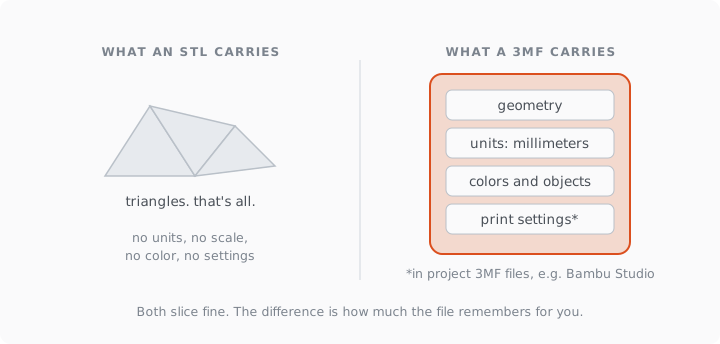
Short version: STL stores triangles and nothing else — no units, no scale, no color, no settings. 3MF stores geometry plus everything around it: real millimeters, multiple objects, colors, and (in slicer project files) your entire print setup. Use 3MF when you have a choice; keep STL for maximum compatibility.
What an STL actually contains
A list of triangles. Each one is three points and a normal, and that is the entire format, dating from 1987 stereolithography. Consequences follow directly:
No units. The file says a vertex sits at coordinate 42; whether that's millimeters, inches or meters is a guess the receiving software makes. This single omission is behind most of the "printed a 4 mm chess piece" stories, and the fix ritual is in how to scale an STL to exact dimensions →.
No structure. One STL is one soup of triangles. Two parts in one file fuse into one object; colors and materials don't exist; there's no place to write "this hole is 5 mm, drilled".
No integrity data. STL predates the idea of validating a mesh, and nothing in the format prevents saving broken geometry — which is how most of the errors in our failure catalog → travel between tools undetected.
What a 3MF adds
3MF is a ZIP container (rename one to .zip and look inside) holding XML that describes geometry in declared units, plus optional payloads. The format guarantees millimeters unless stated otherwise, supports multiple named objects with transforms, carries colors and materials for multi-color printing, and requires manifold geometry by specification — 3MF from a compliant exporter can't legally contain the "triangle soup" that STL happily stores.
Then there's the layer most Bambu and Prusa users meet daily without noticing: project files. Bambu Studio's .3mf projects store the plate layout, printer, filament, layer height, supports, everything — that's why reopening one restores your whole session. A model shipped as a project 3MF prints the way its author set it up, not the way your defaults happen to fall. It's also why print profiles on MakerWorld are 3MF files, and why PHORM's Bambu export is one: geometry plus a working profile for the machine, rather than bare triangles and good luck. The What you get from each format is on the repair page →, which returns both.
So when does STL still win?
Compatibility and simplicity. Every mesh tool from 1990 onward reads STL; some older or niche software still writes nothing else; game-engine and CAD interchange pipelines often expect it. If you're feeding a mesh into repair tools, editors and analysis software, STL is the least-drama container. If the file's final destination is a slicer, 3MF carries more truth.
| STL | 3MF | |
|---|---|---|
| Units | none, guessed | declared, defaults to mm |
| Multiple objects | fused | named, positioned |
| Colors / materials | no | yes |
| Print settings | no | yes, in project files |
| Manifold requirement | none | required by spec |
| Reads everywhere | yes | nearly everywhere, 2020s software |
The practical rules
Downloading a model to print: prefer the 3MF when offered, especially a project 3MF with a profile; scale and units arrive intact. Sending someone a model: 3MF if they slice it, STL if they'll edit the mesh. Archiving your own work: 3MF, because two years from now the embedded settings are the part you'll miss most. And whichever container you use, the geometry inside still has to be closed and printable; formats don't repair meshes — what watertight means → applies to both equally.