You scaled the model to exactly 60.0 mm, printed it, and the calipers say 59.5. Nothing went wrong; physics happened. Plastic leaves the nozzle above 200 °C and cools to room temperature, and cooling plastic contracts.
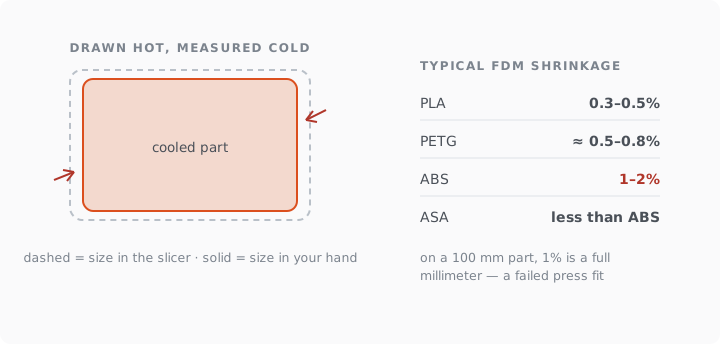
Short version: PLA shrinks the least (about 0.3–0.5%), PETG a bit more (roughly 0.5–0.8% in practice), ABS the most (1–2% on printed parts, per Prusa's materials documentation). On a 100 mm part, 1% is a full millimeter — the difference between a press fit and a part that rattles.
The numbers, with their sources
Two kinds of numbers circulate, and mixing them causes most confusion. Polymer datasheets state mold shrinkage, measured in injection molding: industry tables list PLA at 0.3–0.5%, PETG at 0.2–1.0%, ABS at 0.7–1.6%, ASA at 0.4–0.7%. FDM parts shrink somewhat differently, because they cool layer by layer instead of as one hot mass. Measurements on actual printed parts land close by: a Binghamton University study that printed and measured test parts found in-plane shrinkage around 0.35–0.63% for PLA, 0.54–0.76% for PETG and 0.59–0.69% for ABS on an enclosed printer, while Prusa's knowledge base puts real-world ABS at 1–2% depending on geometry and how well the chamber holds heat. ASA behaves like a better-mannered ABS; Prusament's own material page says plainly it "doesn't suffer from shrinking so badly".
The practical reading: treat PLA as sub-half-percent, PETG as roughly half to one, ABS as one to two, and calibrate on your machine when the number matters, which is exactly what Bambu's shrinkage wiki recommends instead of publishing universal constants.
What shrinkage does to your parts
Overall size lands short: the 59.5 mm story above. Holes shrink inward from every side, which is why printed holes run undersized even in PLA; Bambu's slicer exposes an X-Y hole compensation for this, with suggested starting values of 0.05 mm for PLA, 0.1 for ABS and PETG. Long flat parts warp: shrinkage pulling against bed adhesion curls corners, and the higher-shrinkage the material, the stronger the pull — the entire reason ABS wants an enclosure. And mated pairs printed in different materials drift apart: a PLA pin in an ABS hole is a different fit than the model claims.
Compensating, from crude to careful
Choose the material for the tolerance. Dimension-critical part, no thermal demands: PLA, and shrinkage mostly disappears below your printer's noise floor. This is the honest first answer.
Scale up by the shrinkage factor. For ABS at 1%: print at 101%. Works well for uniform boxy parts, imperfectly for complex geometry, since constrained regions shrink less than free ones.
Compensate holes separately with the slicer's hole compensation rather than global scale; holes suffer first-layer squish on top of shrinkage.
Calibrate once per material. Print a 100 mm ruler or cube, measure, store the factor. Twenty minutes, permanent answer for your printer, your filament, your chamber.
Iterate the fit. For a mating part, print, test, adjust by the gap you feel, reprint. One iteration is normal even in professional shops; clearances that absorb printer drift are tabulated in the tolerance guide →.
On PHORM's Studio plan, shrinkage compensation for PLA, PETG and ABS is applied to the exported file automatically; on any plan the validator report states exact model dimensions, so your calipers have an official number to argue with. Plans are on the pricing page →
Where this fits in the photo-to-part workflow
Shrinkage is the last of three size battles. First the file needs true dimensions (STL carries no units →), then the fit needs designed clearance, then the material takes its percentage. Skip any of the three and the part misses; the full sequence lives in the photo-to-print workflow →.